Fixing NET::ERR_CERT_INVALID errors on macOS Mojave with Let's Encrypt certificates
I was plagued by certificates errors and this is how I fixed it.
Recently a weird problem started occurring for me when browsing the web with Safari or Chrome.1 These browsers refused to load some sites like stackoverflow.com or letsencrypt.org. Safari complained about the certificate not being standards compliant, while Chromium-based browsers showed a completely valid certificate chain.
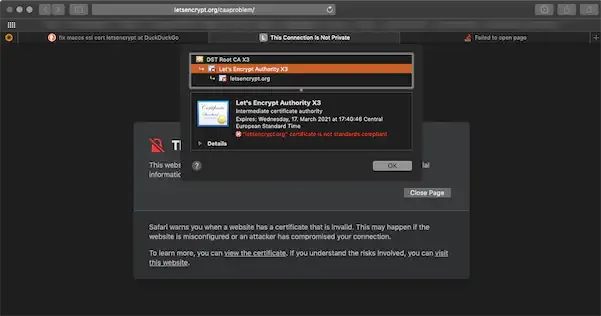
I keep my macOS up to date, scanned it with ClamAV, etc., but there was nothing suspicious. So the problem lies somewhere else. There’s a thread on the Let’s Encrypt community forum with someone having the same problem. While the thread is more an investigation of causes, I just wanted my browsers to work as intended.
The workaround
- Use Firefox to download the
Let’s Encrypt Authority X3 (IdenTrust cross-signed)
file directly from letsencrypt.org/certificates/ - Remove the
.txtextension from the file name, thus renaming it tolets-encrypt-x3-cross-signed.pem. - Open Keychain Access (from
/Applications/Utilities) - Select Login in the upper left
- Select Certificates in the bottom left
- Drag and drop the certificate into the right-hand side of the Keychain Access window.
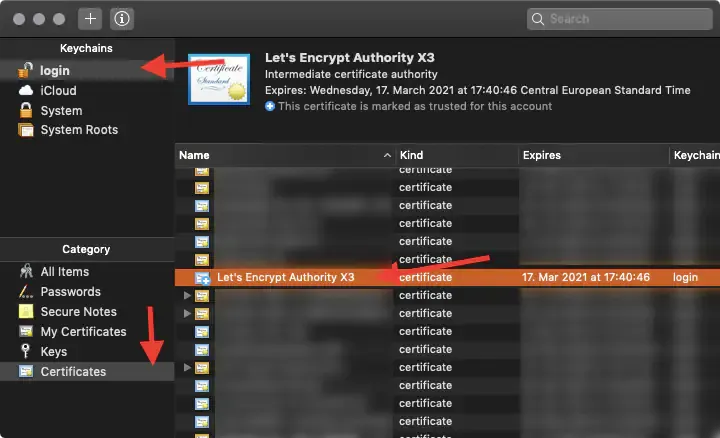
- Right click on the newly added
Let’s Encrypt Authority X3
and Get Info (Select and ⌘+i works fine here, too) - Open the Trust part of the certificate
- Select Always trust
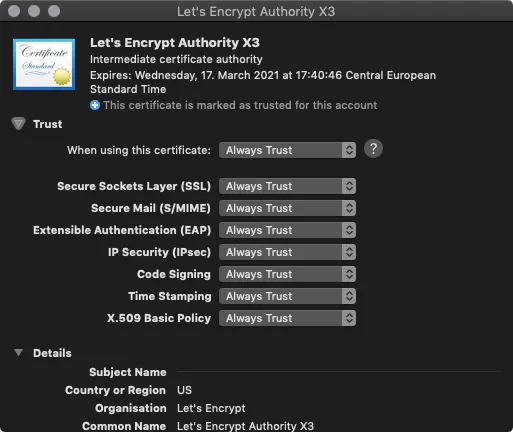
- Restart macOS.
What’s the problem?
I’m not 100 % sure why macOS renders the system-provided cert invalid.
I assume it has something to do with Apple’s upcoming changes in Extended KeyUsage. However, that change is due with macOS 10.15 (macOS Mojave is 10.14).
Footnotes
-
Some browsers, like Firefox, do not rely on the system’s certificate management and bring their own. With such a browser you could still browse. Same goes for some command line utilities like cURL. ↩